







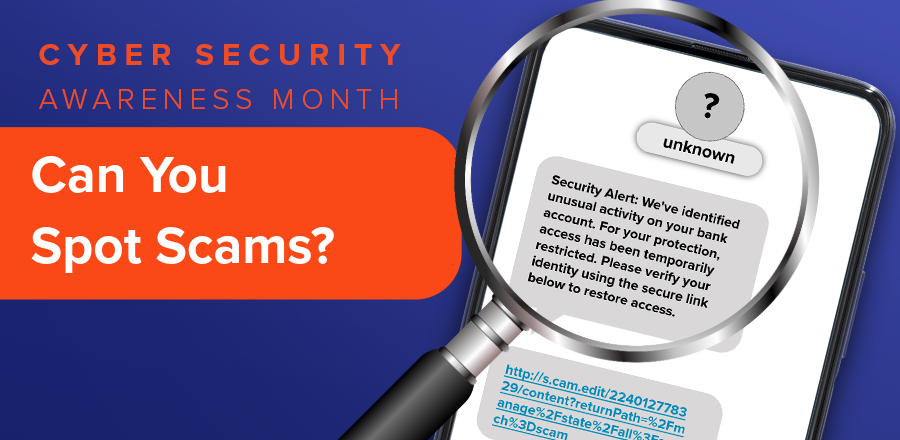
Phishing scams aren’t new, but AI is changing how scammers attempt to trick people into sharing personal information, revealing passwords, and sending money.
In the past, phishing emails were often easier to recognize because of misspelled words, awkward sentences, or poorly designed messages. Today, scammers can use AI tools to write professional-looking emails, create convincing text messages, and impersonate trusted organizations with greater ease.
That means an email that looks legitimate or a text message that sounds professional isn’t necessarily trustworthy.
October is Cybersecurity Awareness Month, making it a great time to learn how AI is changing phishing scams and what you can do to protect your personal information and finances.
What Is AI-Powered Phishing?
Phishing is a type of scam where criminals impersonate a trusted person or organization to trick someone into revealing sensitive information, clicking a malicious link, downloading harmful software, or sending money.
These attempts commonly arrive through emails, text messages, social media messages, and other digital communications.
AI is making these scams more sophisticated. Scammers can use large language models (LLMs), the technology behind AI chatbots, to generate realistic messages in seconds.
According to the FBI, criminals are using generative AI to create convincing fraudulent communications, improve translations, and produce messages more quickly, allowing them to target more people with believable scams. [1]
Although the technology has changed, the goal remains the same: convince you to trust the wrong person and take an action that puts your information or money at risk.
Why Are AI-Powered Phishing Scams Harder to Spot?
AI gives scammers new ways to make fraudulent messages appear trustworthy. Here are three reasons these attacks can be particularly convincing.
1. Fewer Spelling and Grammar Mistakes
One of the most recognizable warning signs of phishing used to be poor grammar or unusual wording. AI tools can now generate messages with polished writing, natural phrasing, and a professional tone. The Cybersecurity and Infrastructure Security Agency (CISA) specifically warns that phishing emails may now contain perfect spelling and grammar, making these traditional warning signs less reliable. [2]
- What to remember: Don’t assume a message is legitimate simply because it’s well-written.
2. More Personalized Messages
Scammers may use information from social media, public websites, or previous data breaches to make their messages more believable. For example, a phishing email could include your name, employer, or other personal details to create the impression that the sender knows you. AI can help scammers incorporate these details into messages that sound natural and relevant to the recipient. [1]
- What to remember: A message containing accurate information about you doesn’t necessarily mean the sender is trustworthy.
3. More Convincing Impersonations
AI can help scammers imitate the communication styles of legitimate organizations, including financial institutions, retailers, and government agencies. A fraudulent message might look like a routine notification from your financial institution, complete with familiar language, branding, and instructions.
Scammers may also direct you to a fake website designed to resemble a legitimate login page. Entering your credentials on that website could give criminals access to your accounts. [3]
- What to remember: Even if a message looks like it came from an organization you recognize, independently verify unexpected requests before responding.
What Could an AI-Enhanced Phishing Scam Look Like?
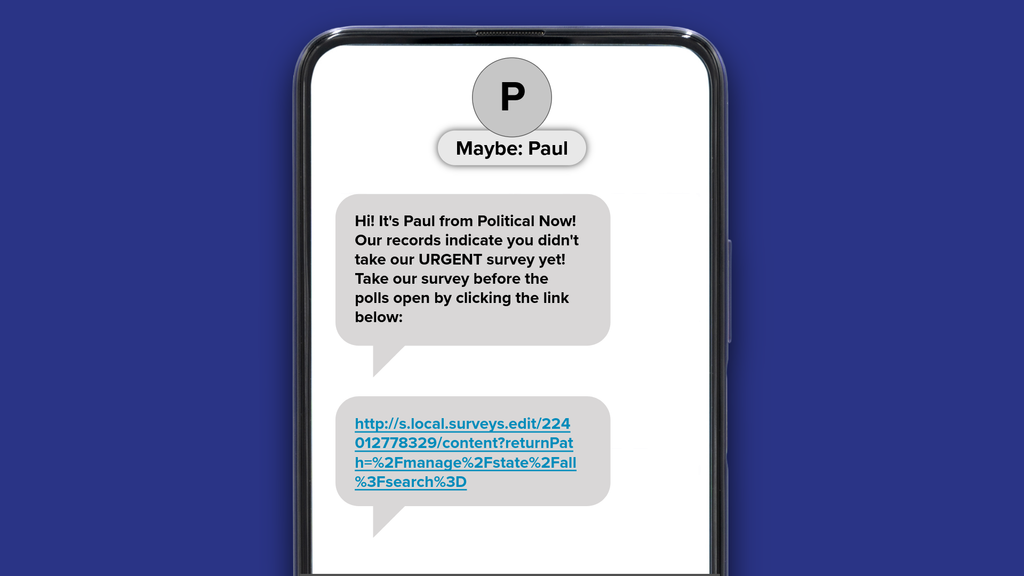
Imagine receiving the following text message:
With the November 3rd midterm elections approaching, you may receive text messages, emails, or phone calls asking you to participate in political polls and surveys.
While legitimate organizations conduct political surveys to understand public opinion, scammers can also use elections and other current events to attract attention and trick people into clicking suspicious links.
Artificial intelligence can make these messages even more convincing by generating professional-looking communications that reference timely events, local issues, or personal information.
5 Warning Signs to Watch For
1. An Unverified Sender: The contact is labeled “Maybe: Paul,” but that doesn’t establish who is actually sending the message. A sender can claim to represent a legitimate polling organization without providing any proof.
2. A Sense of Urgency: The message uses the word “URGENT” and pressures you to complete the survey before the polls open. Scammers often create artificial deadlines to encourage you to act without investigating.
3. An Unexpected Request: The sender claims you haven’t completed a survey, even though you may have never heard of the organization or agreed to participate. This could be an attempt to make you feel obligated to respond.
4. A Suspicious Link: The web address doesn’t clearly match the organization claiming to contact you. It also begins with http:// rather than https://, indicating that the connection isn’t encrypted.
5. An Unusual Web Address: The lengthy URL contains complicated characters and parameters that make it difficult to understand where the link leads. Although legitimate websites can also use long URLs, unfamiliar links in unsolicited messages deserve additional scrutiny.
Not every unexpected political survey is fraudulent. Legitimate polling organizations, research firms, and political campaigns may contact people by phone, email, or text to collect opinions about candidates, issues, and upcoming elections.
However, receiving a message from someone claiming to conduct a political survey doesn’t automatically mean the request is trustworthy. Before participating, consider these precautions:
- Research the organization. Look up the polling company, research firm, or campaign independently. Check whether it has an established website and provides information about who is conducting the survey.
- Verify the website before clicking. Rather than opening a link in an unexpected text, find the organization through an independent search and check whether the survey is legitimate.
- Be cautious with sensitive information. Legitimate opinion surveys might ask about your age, general location, or political preferences. Be suspicious of requests for Social Security numbers, banking information, passwords, or verification codes.
- Watch for unexpected payments or prizes. If a survey asks you to pay a fee, provide financial account information to claim a reward, or send money to participate, treat it as a warning sign.
- Don’t let urgency influence your decision. A message demanding immediate participation doesn’t deserve immediate trust. Take time to verify the sender before responding.
If you’re uncertain about a political survey, there’s no need to click the link or respond. You can ignore the message or verify the request through a trusted, independent source.
How Can I Protect Myself From AI-Powered Phishing?
Although AI is helping scammers create more convincing messages, there are several practical steps you can take to protect yourself.
Step 1. Pause Before You Click
Scammers often create a sense of urgency to pressure you into acting before you’ve had time to think.
Be cautious of unexpected messages that claim:
- Your account has been locked or compromised.
- You must verify your identity immediately.
- A payment or transaction requires urgent attention.
- You’ll face consequences unless you respond quickly.
Take a moment to consider whether the request makes sense before clicking a link, opening an attachment, or sharing information.
Step 2. Verify Requests Through Trusted Channels
If you receive a suspicious message claiming to be from your financial institution, contact the institution directly using its official website, mobile app, or a verified phone number.
Don’t rely on the phone number or link included in the suspicious message.
Remember, Sun East will never call or text you requesting your Online Banking credentials, one-time passcodes, credit or debit card numbers, PINs, or other sensitive personal information. If you receive a suspicious communication claiming to be from Sun East, contact us directly at 610-485-2960.
Step 3. Protect Your Passwords and Verification Codes
Strong account security can help limit the damage if scammers obtain your information.
- Create strong, unique passwords for your online accounts.
- Consider using a reputable password manager.
- Enable multifactor authentication whenever available.
- Never share your passwords, PINs, or one-time verification codes with someone who contacts you unexpectedly.
Multifactor authentication adds another layer of protection by requiring additional verification before someone can access your account. [4]
Check out this blog post to learn how to protect yourself from identity theft.
What Should I Do If I Fall for a Phishing Scam?
Even cautious people can encounter convincing scams. If you suspect you’ve shared information with a scammer, taking action quickly can help limit the damage.
- If you shared a password: Change it immediately through the legitimate website or app. Update any other accounts using the same password and enable multifactor authentication.
- If you shared financial information: Contact your financial institution immediately to report the situation and discuss how to protect your accounts.
- If you clicked a suspicious link or downloaded an attachment: Update your device’s security software and run a security scan. Avoid entering additional information into the suspicious website.
- If you suspect identity theft: Visit IdentityTheft.gov for guidance on protecting your identity and recovering from identity theft.
You can also report phishing attempts to the Federal Trade Commission at ReportFraud.ftc.gov. [3] Sun East members who suspect fraudulent activity should contact us immediately at 610-485-2960.
Sources
[1] Federal Bureau of Investigation, Internet Crime Complaint Center. “Criminals Use Generative Artificial Intelligence to Facilitate Financial Fraud.” December 3, 2024.
https://www.ic3.gov/PSA/2024/PSA241203
[2] Cybersecurity and Infrastructure Security Agency (CISA). “Recognize and Report Phishing.”
https://www.cisa.gov/secure-our-world/recognize-and-report-phishing
[3] Federal Trade Commission. “How To Recognize and Avoid Phishing Scams.”
https://consumer.ftc.gov/articles/how-recognize-and-avoid-phishing-scams
[4] Federal Trade Commission. “Protect Yourself From Phishing Scams.” April 2025.
https://consumer.ftc.gov/consumer-alerts/2025/04/protect-yourself-phishing-scams